How to Make an AI Explainer Video: The Complete Guide (With Real Examples)
Make a polished AI explainer video from a single sentence. Step-by-step instructions, real examples with their prompts, script formulas, costs vs. studios, and mistakes to avoid.
Ibrahim Adepoju··12 min read
On this page
You need a video that explains what you do: your product, your offer, your process. Hiring a studio means weeks of back-and-forth and a four-figure invoice. Learning animation software means weeks of tutorials. An AI explainer video gets you a polished, on-brand result in minutes, from a single sentence.
This guide shows you exactly how to make one, step by step: how to write the brief, pick the right format and length, apply your brand, and refine the result until it's right. You'll see real examples made with ClipMovi (including the exact prompts), proven script formulas, costs compared with studios and freelancers, and the mistakes that make explainer videos fail.
The short version: describe your video in one or two sentences, attach your logo, pick a format, and let the AI design, animate and render it. Then refine it by chatting, the way you'd brief a designer.
An AI explainer video is a short animated video, usually 15 seconds to 2 minutes, that explains one idea (a product, a service, a process or an offer) where artificial intelligence does the production work: writing the scenes, choosing the layout, typography and colors, animating text and graphics, editing your footage and rendering the final MP4.
Traditional explainer videos are made by animation studios or freelancers who storyboard, design and animate every scene by hand. AI explainer video tools compress that whole pipeline into minutes. You describe what you want, and the AI art-directs and renders it.
Why explainer videos work
They make complex ideas simple. Motion, short text and visuals explain faster than a wall of copy.
ClipMovi is an AI video editor that turns a short description into an explainer or animated video. See how it works.
They hold attention. A 30-second animated video is easier to finish than a long landing page.
They work everywhere. Your homepage, product pages, Instagram Reels, TikTok, YouTube Shorts, LinkedIn, ads, onboarding emails and sales decks.
They're reusable. One explainer can be cut into vertical, square and landscape versions for every channel.
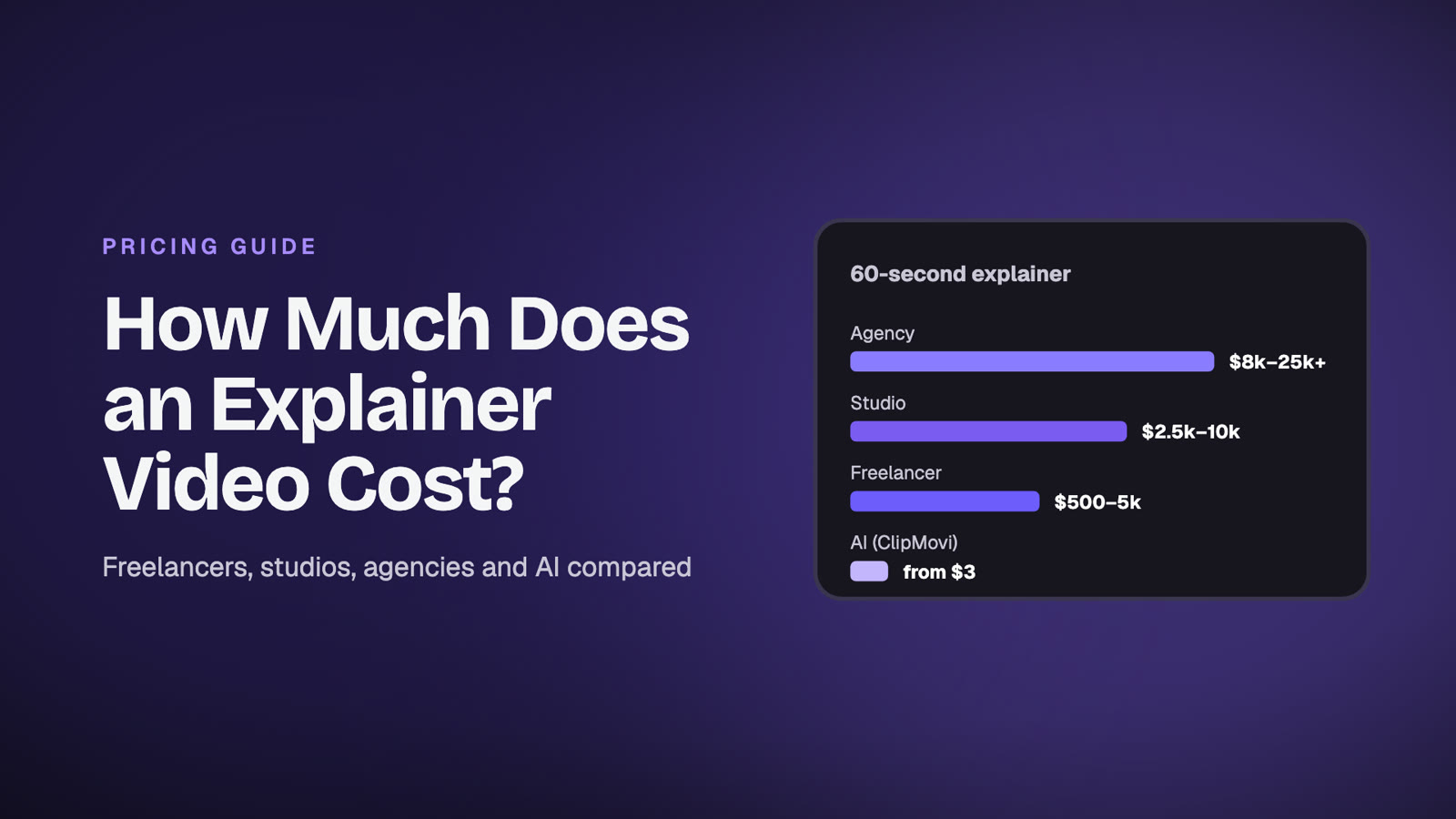
AI explainer video vs. a studio vs. a freelancer
Before you choose how to make your video, it helps to see the trade-offs side by side.
Hiring an explainer video studio or agency
Cost: commonly a few thousand dollars or more for a 60-second animated explainer; premium agencies charge well into five figures.
Time: usually 2 to 6 weeks, including script, storyboard, design rounds and revisions.
Best for: flagship brand films, complex custom character animation, big launch campaigns.
Hiring a freelancer
Cost: from about $50 for template-based work to several hundred dollars or more for custom animation.
Time: a few days to two weeks, depending on revisions and availability.
Best for: one-off videos when you have time to manage the brief and feedback.
Making an AI explainer video
Cost: a few dollars per video. With ClipMovi you pay 1 credit per started 20 seconds, credits never expire, and your first video is free.
Time: minutes. Write the brief, and the video is usually ready in a few minutes.
Best for: product explainers, social videos, launch announcements, ads, promos, training clips, and anyone who needs good videos often without a production budget.
The real difference isn't only price. It's iteration. With a studio, every change costs time and money, so you stop asking for changes. With an AI explainer video, you can try three angles in an afternoon and keep the one that works.
Real AI explainer video examples (with the prompts)
Here are three videos made with ClipMovi, each from a short brief. No editing, no templates filled in by hand. Watch them, then read the prompt that made each one.
Example 1: an animated data and results video (9:16, 30 seconds)
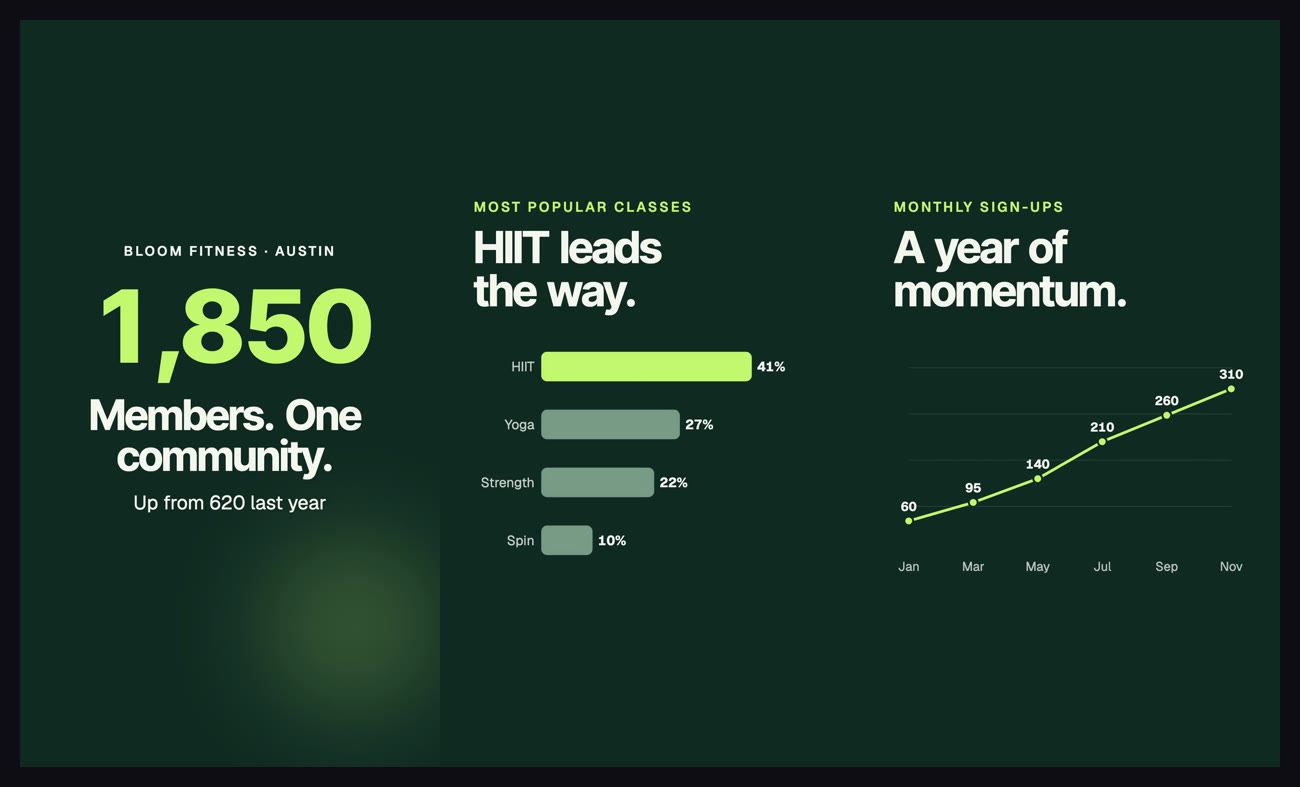
A year-in-review video where the numbers become animated counters and charts.
The prompt:Year-in-review video for Bloom Fitness, a boutique gym in Austin. This year: 1,850 members (up from 620 last year), 96% of members rate their coaches 5 stars, 12,400 classes taught. Most popular classes: HIIT 41%, Yoga 27%, Strength 22%, Spin 10%. Monthly sign-ups went Jan 60, Mar 95, May 140, Jul 210, Sep 260, Nov 310. Energetic, proud, thank the community. CTA: Join the 2027 crew at bloomfit.co
Give the AI real numbers and it turns them into animated counters, bar charts and line charts: the kind of infographic explainer that usually needs a motion designer. It only uses the facts you provide, so your numbers stay accurate.
Scenes from the data video: counters, a ranked bar chart and a trend line, all generated from the brief.
Example 2: a SaaS product explainer (16:9, 30 seconds)
A 30-second landscape product explainer with app screens drawn by the AI, made from one paragraph.
The prompt:Product explainer for Ledgerly, a bookkeeping app for small business owners. Hook: owners lose 5+ hours a week to receipts and spreadsheets. How it works in 3 steps: 1) connect your bank in one click, 2) Ledgerly sorts every transaction into the right category automatically, 3) get a clean monthly profit and loss report. Show each step with a rich, polished illustration of the app (a phone or dashboard mockup with real-looking UI, category tags, a profit chart). Premium, modern SaaS look like Stripe or Linear: deep navy with a fresh green accent, generous whitespace, bold headlines. End with the logo wordmark Ledgerly and CTA button: Try Ledgerly free, ledgerly.app
Notice how much the brief steers the result: a hook with a number, a clear three-step "how it works", a described visual style, and one call to action. The AI drew the phone screen, the transaction list and the profit chart itself. You don't need product screenshots to get a polished SaaS explainer, though you can attach real screen recordings and it will zoom into the parts that matter.
Example 3: a local business promo (9:16 Reel, 15 seconds)
A 15-second vertical Reel for a neighborhood bakery: warm, quick, and ready for Instagram.
The prompt:Instagram Reel for Rosa's Bakery in Portland: fresh sourdough every morning, weekend cinnamon rolls, and coffee from a local roaster. Warm, cozy and inviting. CTA: Visit us on Alberta Street this weekend
No photos were attached, so the AI found fitting royalty-free photos and music on its own, and drew the coffee cup. Attach your own photos or clips and it builds the video around them instead.
How to make an AI explainer video in 7 steps
Here's the exact process, from blank page to finished MP4. It takes about five minutes of your time.
Step 1: Decide the one thing your video must explain
Every great explainer video explains one thing to one audience. Before you type anything, finish this sentence: "After watching, [audience] will understand [one idea] and will [one action]."
Small business owners will understand that Ledgerly sorts their books automatically and will start a free trial.
Locals will know we bake fresh every morning and will visit this weekend.
If you try to explain everything your product does, you explain nothing well. Make one video per idea instead; with AI, extra videos are cheap.
Step 2: Write a short brief (your prompt)
You don't need a full script. A strong brief has five parts:
Who you are: business name and what you do.
The problem your audience has.
How you solve it, ideally as 2 to 4 simple steps or benefits.
The tone: calm, energetic, premium, playful, friendly…
The call to action: exactly what viewers should do, with your link or location.
Add any real facts you want shown, such as prices, dates, ratings or results. The AI uses only what you give it and never invents claims, so include the details that matter.
Step 3: Choose the format and length
Pick the format for where the video will live:
9:16 vertical for Instagram Reels, TikTok, YouTube Shorts and Stories.
1:1 square for feeds and LinkedIn.
16:9 landscape for websites, YouTube, presentations and product pages.
For length, 15 to 30 seconds suits social media and ads, and 45 to 90 seconds suits homepages and product explainers. ClipMovi makes videos from 15 seconds up to 2 minutes, so you can make a short cut and a long cut of the same idea.
Step 4: Add your brand
Attach your logo and set your brand colors and fonts, or save them once as a brand kit that fills in every new video automatically. When you upload a logo without choosing colors, the AI reads the colors from your logo and builds the palette around them, so the video looks like your brand and not a template.
Step 5: Add media (optional)
Attach product photos, screen recordings or clips if you have them. The AI watches your footage, finds the strongest moments, trims and orders the shots, and zooms into the part of a screen recording that matters. No media? Leave stock media on, and it finds fitting royalty-free photos, clips and background music for you.
You can also add a voice-over. The AI transcribes it and cuts the scenes to your words, so each line of narration lands on the right visual.
Step 6: Pick a style or let the AI design
Choose a template from the gallery for a proven look (product launch, real estate tour, testimonial, sale offer, results recap and more), or leave it on Custom design and the AI creates an original design for your brand from scratch. You can even use one of your earlier videos as the template for a new one.
Step 7: Generate, review and refine
Click Create. The AI plans a storyboard, designs every scene, then checks its own work: it renders a frame of each scene and fixes anything cramped, cut off or hard to read before the final render. A few minutes later your video is ready to watch.
Then refine it in Design Studio by chatting, the way you'd brief a designer:
"Make the headline bigger and slow down the ending."
"Switch this to a 9:16 version for Reels."
"Use our new photo in the opening."
You can pause the preview and point at exactly what you want changed, such as a headline, a button or one bar in a chart, so the AI knows what "this" means. Every message makes a new version, and you can restore any earlier version in one click. Download in up to 1080p when you're happy.
The AI writes the on-screen copy for you, but telling it which structure to follow gives you a sharper video. These three formulas cover most explainers.
1. Problem → Solution → How it works → CTA
The classic product explainer. Open on the pain ("Still doing your books at midnight?"), introduce your product as the fix, show 2–3 simple steps, and end on one clear call to action. Best for SaaS, apps and services.
2. Hook → Benefits → Proof → CTA
Lead with your boldest promise or number, show the top three benefits, add proof (a rating, a customer count, a result), then ask for the action. Best for ads and social media.
3. Before → After → Bridge
Show life before your product, life after it, and your product as the bridge between them. Best for transformations: fitness, home services, coaching, renovations.
Tip: keep on-screen text to 2–6 words per line and one idea per scene. Viewers read headlines, not paragraphs, especially on a phone.
Animated explainer videos vs. AI avatar videos
When people search for an AI explainer video, they find two very different kinds of tool:
AI avatar videos put a digital presenter on screen reading your script. Good for training and internal announcements, but they can feel impersonal for marketing.
Animated explainer videos use kinetic typography, motion graphics, illustrations, charts and your own footage. They feel like the work of a motion design studio and suit ads, product pages and social media.
ClipMovi focuses on animated, motion-graphics explainers: bold type, smooth transitions, animated charts and illustrations, your brand colors and your footage. They're the videos businesses actually post on their websites and social channels.
Ways to use AI explainer videos
Homepage and landing pages: a 45–60 second explainer above the fold.
Product launches and feature announcements: one short video per feature.
Social media: 15–30 second vertical cuts for Reels, TikTok and Shorts.
Ads: test several hooks quickly and keep the winner.
Sales and onboarding: explain how it works before the demo call, or welcome new customers.
Local businesses: weekly specials, events, open houses and seasonal offers.
Reports and results: turn numbers into animated charts for investors, clients or your community.
7 mistakes that make explainer videos fail
Explaining everything. One idea per video. Make more videos instead.
Too much text. If a viewer needs to pause to read it, it's too long.
No clear call to action. End with one specific action and where to do it.
The wrong format. A landscape video posted as a Reel wastes most of the screen.
Off-brand colors and fonts. Inconsistent branding makes even great videos look generic.
A slow start. The first two seconds decide whether people keep watching. Lead with the hook.
Never iterating. Your first version is a draft. Ask for changes until it's right.
Your AI explainer video checklist
One idea, one audience, one action.
A brief with: who you are, the problem, the solution, the tone and the CTA.
Real facts and numbers you want shown.
Logo and brand colors (or a saved brand kit).
The right format for the channel: 9:16, 1:1 or 16:9.
15–30 seconds for social, 45–90 seconds for websites.
Your own photos, clips or voice-over (optional).
One round of refinement in Design Studio.
Frequently asked questions
How long should an explainer video be?
For social media and ads, 15 to 30 seconds. For homepages and product pages, 45 to 90 seconds. Shorter is usually better: keep only what serves your one message.
Can AI make an explainer video for free?
Yes. ClipMovi gives you your first video free when you sign up, with no credit card needed. After that you buy credits: 1 credit per started 20 seconds of video, and credits never expire.
How long does it take to make an AI explainer video?
Writing the brief takes a couple of minutes, and the video is usually ready a few minutes after you click Create. Refinements follow the same pattern: describe the change and a new version renders.
Can I use my own logo, fonts and brand colors?
Yes. Upload your logo and fonts (or pick from Google Fonts) and set your colors, or save everything as a reusable brand kit. Without colors, the AI builds the palette from your logo.
Can I add a voice-over or my own music?
Yes. Attach a voice-over and the AI times the scenes to your words. Attach your own music, or let it pick a royalty-free track.
Can I edit the video after it's made?
Yes. In Design Studio you chat with the AI to change anything: text, timing, colors, format, length or media. You can point at an element in the preview to show exactly what to change, and restore any earlier version.
What's the difference between an explainer video and an animated video?
An explainer video is defined by its purpose: explaining one idea. An animated video is defined by its style: motion graphics instead of live footage. Most explainer videos are animated, because animation makes abstract ideas easy to show.
Is an AI explainer video good enough for my website or ads?
For most businesses, yes. Modern AI video tools produce clean motion design with your branding, in 1080p. For a flagship brand film with custom characters, a studio may still be worth it; for everything else, AI lets you make more videos and improve them faster.
Make your first AI explainer video
You now know the formula: one idea, a five-part brief, the right format, your brand, and a quick round of refinement. The fastest way to learn is to make one.
 Ibrahim Adepoju12 min read